ONECRM+ / REPORTS & DASHBOARDS

Build reports around
the questions you ask.

Start with a sales, service or operations template, or choose your own data. Turn the result into a table, a number or a chart, then bring it into a dashboard.

  • Guided templates and manual report building
  • Bar, line, pie, donut and number displays
  • Saved dashboards and up to three report cards above object lists
OneCRM+ / Reports and dashboardsEXAMPLE WORKSPACE
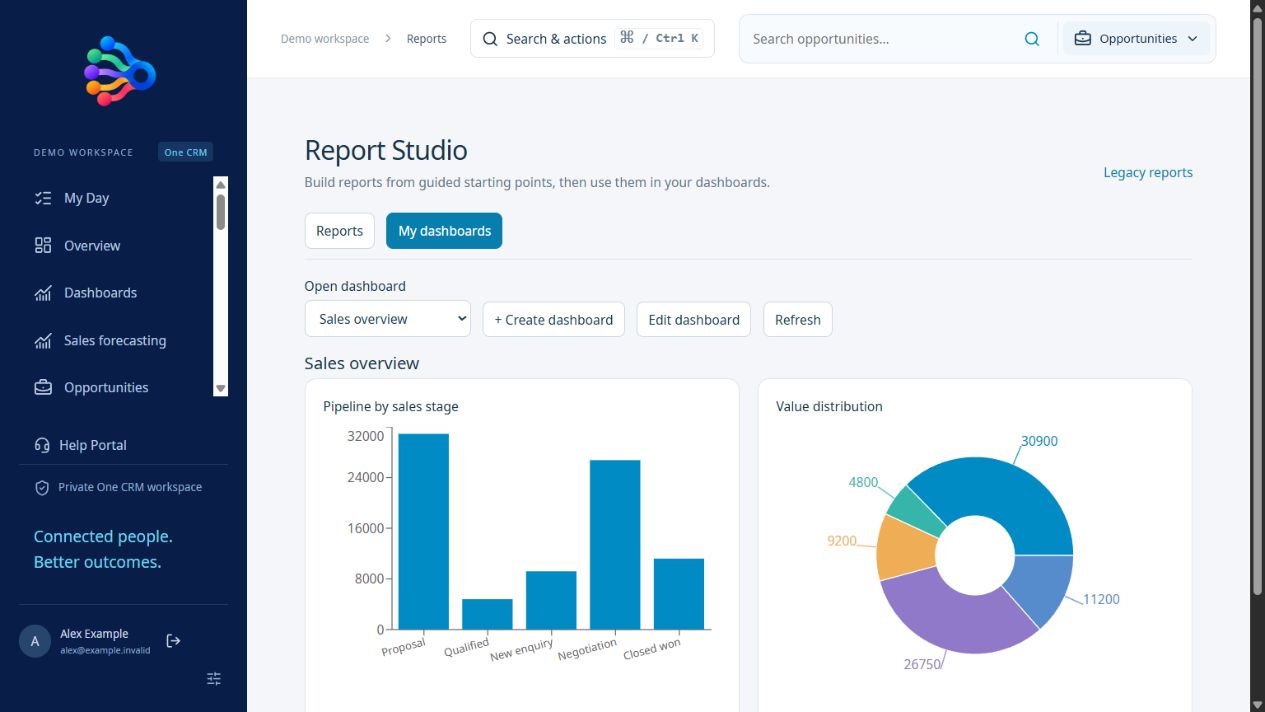
OneCRM+ dashboard displaying sales pipeline value as a bar chart and a donut chart with fictional data
Working application · fictional example dataView full size ↗
01

Start with the question

Choose a template for pipeline, won sales, service workload, stock or production. You can also build manually, selecting a supported dataset, fields, filters, grouping and summary. This gives you a practical starting point without scrolling through every field.

02

Choose how the answer appears

Compare groups with a bar chart, show a distribution with a pie or donut chart, use a line for a suitable series, or focus on a single summary number. Save the report and arrange its visualisations on a dashboard.

03

Put the result beside the work

Search your saved report library and choose up to three cards above an object list. Each uses the report’s saved filters. Published custom objects can participate in reports and dashboards, with record and field permissions still enforced.

A PRACTICAL STARTING POINT

From setup to daily use.

01 / SELECT

Pick the data.

Choose a report template or a supported object and its fields.

02 / SUMMARISE

Set the calculation.

Apply filters, grouping and a count or other supported summary.

03 / DISPLAY

Save the view.

Choose a chart and use it in a dashboard or above a record list.

Questions about reports & dashboards.

Can I report on custom objects?

Yes. Published custom objects are available to permitted report and dashboard users. Record scope and field permissions still apply.

Are forecasting and targets included?

Yes. The forecast builder supports configurable periods, stage probabilities, company, team and user targets, manager adjustments and saved snapshots.

Does every chart reflect the table search?

Object report cards use their report’s saved filters independently of the table search. Review those filters when comparing results.

THE WHOLE SUITE. FROM DAY ONE.

Your ambition.
All the tools to match.

$50 AUD per user, per month, excluding GST. Every feature included.
Start with a 30-day free trial. No card required.

Start your free trial →