Make the logic visible
Drag nodes into the canvas, move them by their handles and connect outputs to the next step. Decisions create separate Yes and No paths. Typed controls let you choose real fields, configured options and named related records.
Connect triggers, decisions and actions on a visual canvas. Preview the route through a flow before activating it for customer records or work boards.
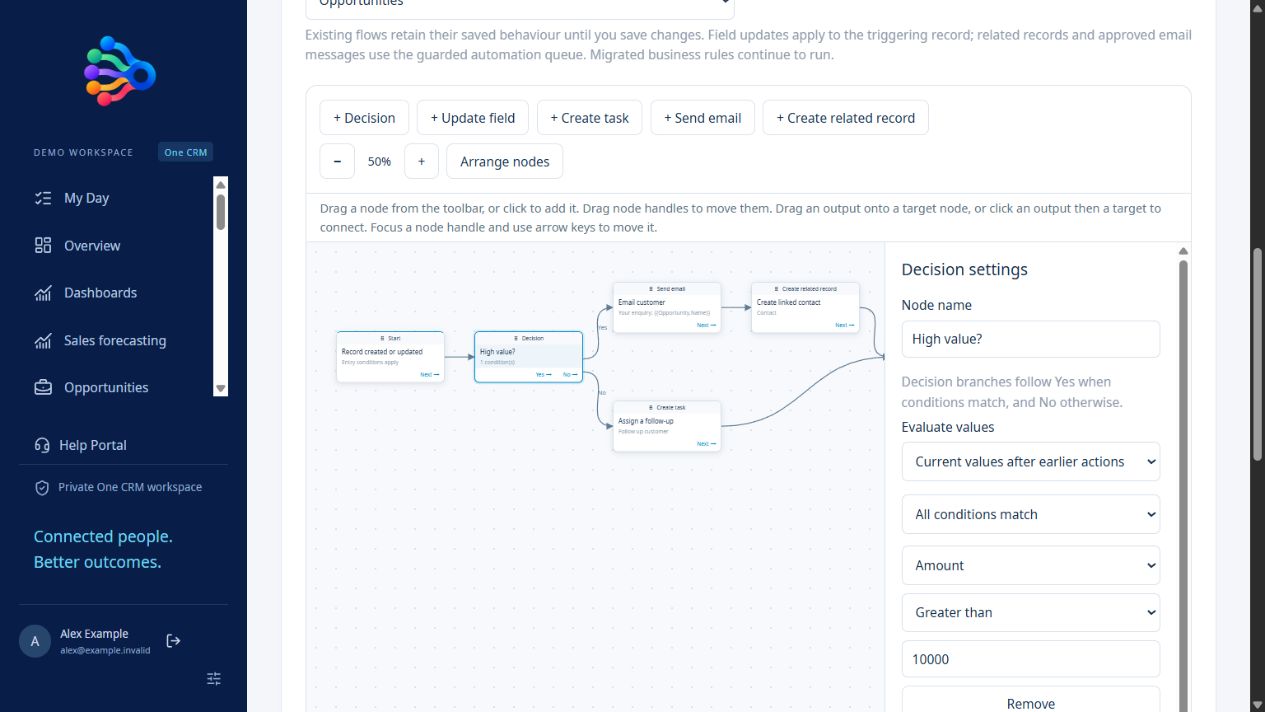
Drag nodes into the canvas, move them by their handles and connect outputs to the next step. Decisions create separate Yes and No paths. Typed controls let you choose real fields, configured options and named related records.
Update fields, create assigned tasks or create related CRM records with required field mappings. Email actions use a selected connected Microsoft 365 mailbox and either a template or a plain-text message. Activating an email flow approves future messages from that mailbox.
New flows start as inactive drafts. A dry run shows the planned path without changing records or sending messages. One-off, daily and weekly schedules support a chosen timezone. Background scheduling is prepared but remains off until launch; administrators can confirm a manual due-flow run.
Select the record or board event and any entry conditions.
Draw the branches and map the fields each action needs.
Check results and email recipients, then inspect execution history.
No. Email actions require a connected mailbox, explicit activation approval and delivery checks. Editing or deactivating a flow prevents its old queued version from authorising delivery.
Yes. Map required fields from the source record or fixed values. Automatically numbered cases retain their CRM numbering.
The unattended runner is implemented, but hosting-level background execution is deliberately off until launch. Activation alone does not install a hosting schedule.
Screenshots, practical examples and setup details for the tools in your subscription.
Bring assigned tasks, customer follow-ups, events and board work into My Day. Use quick actions, live search suggestions and record previews in OneCRM+.
View the featureBuild CRM reports with filters, summaries and charts. Create dashboards, pin three reports above records and use guided report templates in OneCRM+.
View the featureBuild CRM workflows with a drag and drop canvas, decisions, email actions, tasks, related records and timezone-aware schedules in OneCRM+.
View the featureOrganise work in editable boards with status fields, people assignments, due dates, linked records, files and configurable workflow automation.
View the featureBuild public customer forms with typed fields, conditional questions, file uploads, staff submission permissions and supported CRM record actions.
View the featureCreate custom CRM objects, adopt fields, add relationships, configure layouts and grant role permissions. Use published objects in reports and dashboards.
View the featureConnect products, purchasing, stock movements, backorders, returns and manufacturing orders with customer records in the OneCRM+ business suite.
View the feature$50 AUD per user, per month, excluding GST. Every feature included.
Start with a 30-day free trial. No card required.